A Client Wants to Build a Website with AI. Which Costs Actually Matter?
Export businesses with many products and languages want AI to reduce website costs, but is the saving in development or ongoing maintenance? This breakdown examines product structure, multilingual content, the CMS, review and rollback to identify the costs that matter before choosing a platform.

A recent client consultation, with identifying details removed, illustrates some of our decisions.
The client is an export manufacturer planning to use AI to build a new website. It has several hundred product records and wants English plus several other languages. This is not its first website: an earlier version modeled on competitors' sites never became useful in practice.
This time, the client had learned quite a lot about AI website building and had a clear goal: reduce labor and costs.
The direction makes sense. But our conversation revealed a common gap: knowing AI can save money without knowing which part of this particular project it will save money on.
Here is how we worked through that question together.
In these consultations, we do not start by promoting a familiar technology stack. We first clarify product scale, content volume, maintenance responsibilities and delivery boundaries, then offer technical advice and a proposed approach. The technology should follow from those conditions.
1. Why did the first website never become useful?
The client was candid: the first site was commissioned by asking someone to imitate competitors. This is common. Without established criteria, competitors' websites help people understand page types, information presentation and user journeys.
But reference is different from copying. You see the competitor's pages, while its product count, languages, update frequency and maintenance process remain largely invisible.
Suppose that competitor manages a few dozen products in one language, while you have several hundred product records, multiple languages and regular new releases. Even if the pages look alike, their content structures and administrative complexity are on very different scales.
The first site's failure to become useful therefore may not have been poor page design. Its content structure and maintenance approach may never have been redesigned for the client's own business volume.
2. Products can launch in stages, but structure should accommodate future scale
We first established three things: the total product count, what should launch in phase one, and how often updates would follow.
Several hundred records do not all need to be completed at once. A more practical approach is to select core categories and representative products, establish content in the main languages, the inquiry journey and the administrative workflow, then gradually add products and languages.
**A phased launch does not mean temporarily building as though this were a small website.** Total product volume and multilingual requirements still affect categorization, fields, URL rules and the CMS structure. Ignoring future expansion may speed up the first release, only to require restructuring when more products arrive.
There is no need to expose every filter immediately either. First, model materials, processes, specifications and series as consistent product attributes. When a category grows and users genuinely need to narrow their choices, appropriate attributes can become filters.
Keyword combinations with independent search demand and sufficient distinct content can have dedicated landing pages. Whether filter URLs should be indexed also needs planning before launch.
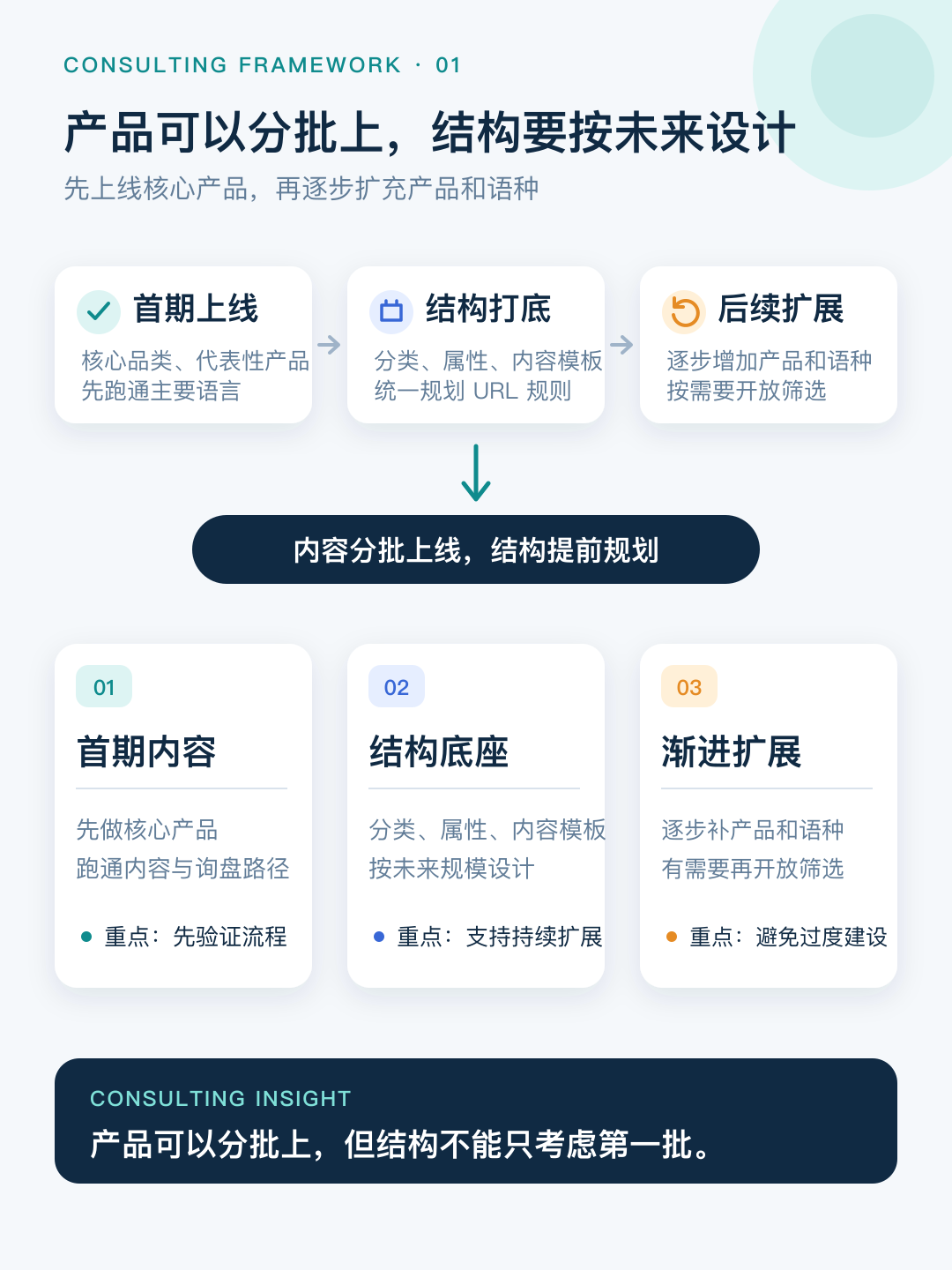
The real problem is therefore deciding what belongs in the first phase and how to expand reliably, rather than completing hundreds of products at once.
3. AI can reduce costs beyond the initial build
Many descriptions of AI website building emphasize producing the first version faster and more cheaply. That saving is real, and we also use AI to shorten development and content organization where appropriate.
But for export sites with many products, languages and ongoing additions, initial development is only one stage of investment. Organizing product information, multilingual content, page updates and synchronization continue after launch, and their costs accumulate.
In this project, AI is best suited to two kinds of work: drafting multilingual content from confirmed information and templates, and performing bulk entry, formatting and some page changes within clear permissions and rules. Technical product facts, brand wording and final publication still require human confirmation.
The saving depends not just on the AI tool, but on whether content fields, import and export, preview and review, version records and rollback are designed into the site.
AI can still be connected later, but that usually requires additional data cleanup and interface work. A website built quickly is not necessarily easy to maintain.
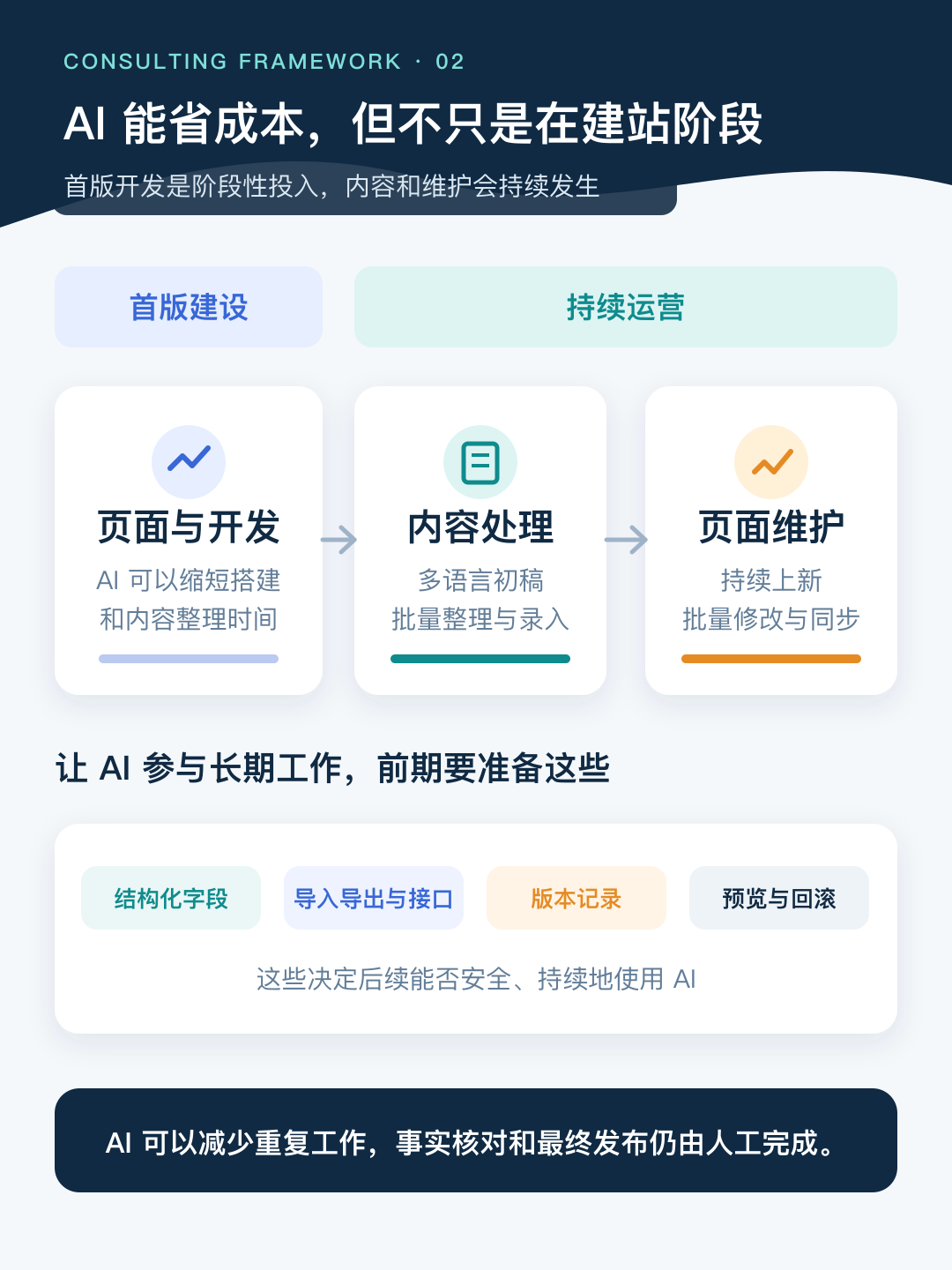
This leads to the next question: how should the CMS let operations staff see and edit content while making AI changes reviewable and reversible?
4. The CMS choice determines who can edit the site next year
The client's initial question was: “AI maintenance is a black box. I don't know what it added. Would WordPress be better because it has a visible administration interface?”
The concern is reasonable. But the actual need includes traceable changes, previews before publication and rollback after errors, as well as a visible CMS. WordPress is the first solution that came to mind, not the only possible answer.
**We first divided pages into two groups.** Product names, specifications and parameters change frequently and directly affect inquiries, so operations staff must be able to edit and confirm them. AI can draft blog posts, buying guides and landing pages from source materials and templates, while people verify technical facts, purchasing advice and brand statements.
The platform comparison therefore centers on four questions: can operations staff edit independently, can AI process content in bulk, can changes be tracked and rolled back, and can another person take over later?
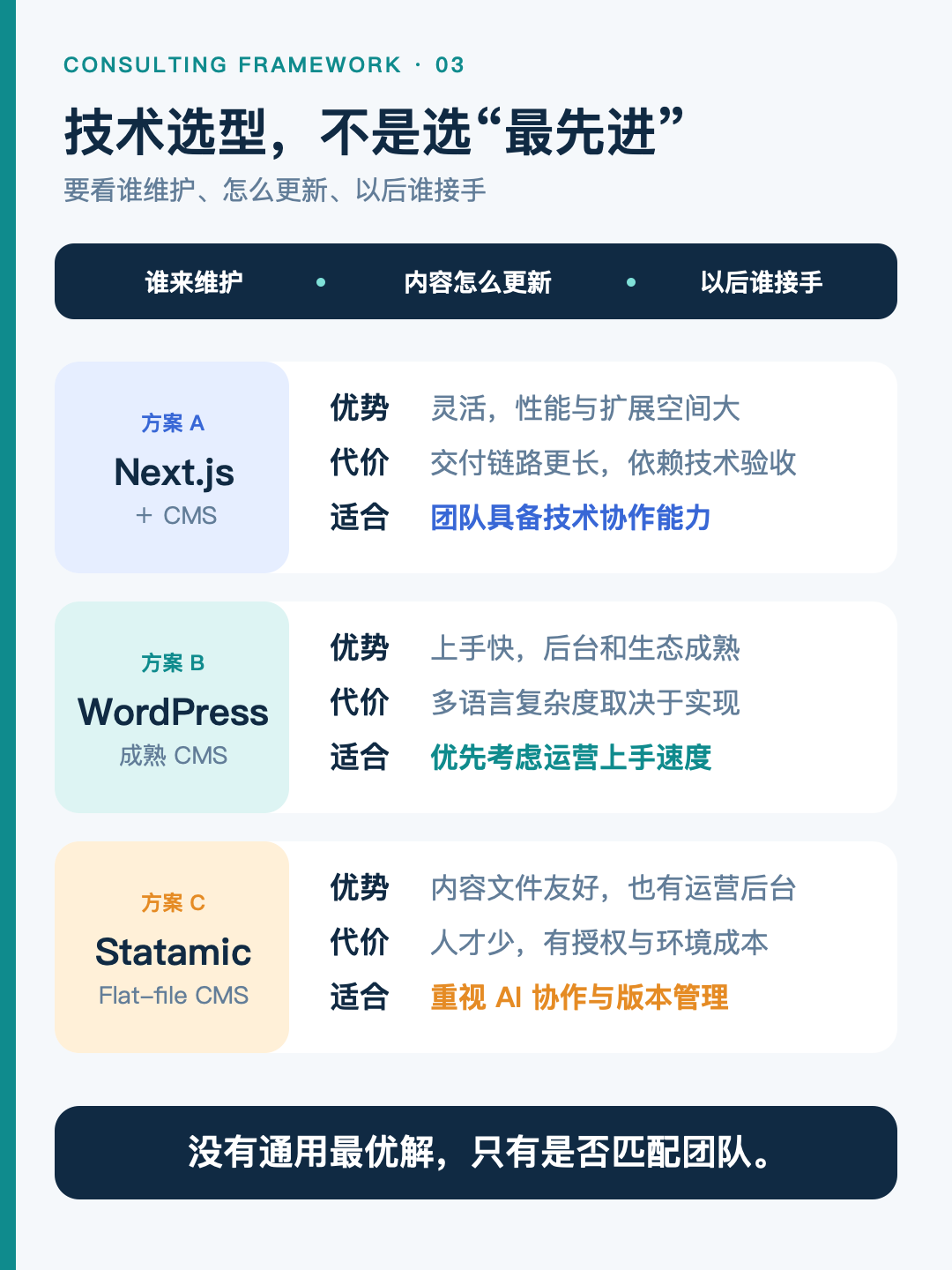
We compared three representative approaches: Next.js with code-managed content or a headless CMS, WordPress, and a CMS such as Statamic with file-based content support by default. These are not the only options; they represent three different ways to manage content.
The Next.js approach. Next.js is a development framework, not a content administration system by itself. Content managed with code goes through code review and deployment. Connecting a headless CMS gives operations staff a graphical interface, but adds components and maintenance complexity.
The WordPress approach. WordPress has a mature, approachable administration interface. Multiple languages usually rely on plugins or multisite configurations, with complexity determined by product structure and translation workflow. Database storage does not prevent AI from working in bulk through REST APIs or import and export, but permissions, review and rollback still need advance design.
The Statamic approach. Statamic can store content in files by default while providing a graphical CMS and multilingual structure. With explicit repository permissions and operating rules, AI can process content files through preview and publication workflows. Statamic can also use a database, and multisite is a Pro feature. Licensing, the PHP runtime and future maintenance ownership need consideration.
Given this project's content volume, multilingual requirements and maintenance roles, we recommended evaluating Statamic first. This was not a claim that it is universally better. For this project, it combined an operations interface, file-based content and AI bulk processing. Adoption still depended on the client's acceptance of the handover costs and technical environment.
Whatever the final platform, what gets delivered matters even more.
Alongside source code, we recommend including AI skills and an AGENTS.md file in the deliverables. These are project instructions for AI: where content belongs, which rules changes must follow and which areas must not be touched.
Version history, a preview environment and before-and-after comparisons make AI changes visible. Basic inspection, comparison and rollback can be taught. Code changes, deployment and high-risk data changes should still be handled by developers.
Once the CMS and handover approach are clear, another question remains: can search engines find each published language version separately?
5. For multilingual search, each language should have its own URL
The client asked an important question: “Does each additional language have a separate link?”
Some export sites we encounter embed a browser-side translation tool. Switching languages makes the page appear multilingual. This is one place where attempts to save money can go wrong.
The issue is not using a plugin, but what it produces. Some plugins generate independent URLs and hreflang and can support multilingual SEO. **Check for crawlable individual URLs, complete translations, internal links and sitemaps.** If text changes only after a visitor clicks a control, search engines may still see only the default English content.
**For multilingual SEO, a more reliable approach is a separate URL for each language version, supported by hreflang, internal links and sitemaps.** URLs can use subdirectories, subdomains or separate domains. These settings help search engines understand the versions, but do not guarantee indexing or rankings. Decide them during the build where possible; adding them later is possible but increases migration costs.
AI changes the cost structure of multilingual content production, not the fundamentals of SEO. Complete translations and continuing updates that once seemed too expensive are now more feasible. For clients like this, the priority is often restoring foundational work previously abandoned because of cost, before studying how to appeal to AI search.
6. Once inquiries arrive, establish a CRM process before commissioning custom software
The consultation also covered CRM, which directly affects how inquiries are handled after launch.
A website should launch with at least a basic follow-up process. It does not necessarily require a custom CRM, but responsibilities must be clear: who receives inquiries, where they are recorded, when follow-ups happen and how they are handed over. Memory may work at low volume, but becomes unreliable as inquiries grow.
Our recommendation at this stage was to set up the process, rather than commission a custom CRM.
The client needed ordinary customer management: prospects, existing customers and follow-up records. Established SaaS products or templates can generally cover these needs faster and at lower cost. Consider customization when deep integration, unusual workflows or compliance requirements genuinely exceed those products. Before that point, custom software is likely to be less usable than mature alternatives.
We build custom CRM and ERP systems, but the early priority is getting follow-up working, rather than spending money to build a tool.
Final thoughts
The client began by asking which technology to use. By the end, we had clarified three earlier questions: what to launch first, who will maintain it and where AI participates.
AI can shorten initial development and reduce repetitive content and page-maintenance work afterward. That depends on designing content structure, permissions, review, version history and rollback into the website.
We did not rush to quote a number. We first clarified scale, content structure and maintenance, then discussed the solution and price. We prefer to establish the project boundaries and ongoing costs before proposing an executable plan.
Related reading
Building a Multilingual Website: Translation Plugins, Subdirectories or Subdomains?
If AI Can Translate Automatically, Why Can't Businesses Add More Languages Immediately?
Planning a website project?
Share your product range, language requirements, launch priorities and maintenance plans so we can discuss the project scope.