Competitors Are Producing Content Quickly with AI. Should You Rebuild a Ten-Year-Old WordPress Site?
The series ends with the most practical decision: keep maintaining an established site, upgrade part of it, or rebuild it entirely.

AI × WordPress Series · Part 8 of 8
The series ends with the most practical decision: keep maintaining an established site, upgrade part of it, or rebuild it entirely.View the series contents
If your WordPress website has been in use for years, with many products and older pages, perhaps in multiple languages, a question has probably become harder to ignore over the past two years: has the site fallen behind?
Competitors use AI to generate content and pages quickly, while you still need outside help to add a product. You hesitate to touch the site, but worry that staying as you are means missing the changes.
For export businesses and companies expanding overseas, the anxiety is not that the site looks old. It is that their way of updating it may no longer keep pace.
Our first response is usually not to recommend replacing the site, but to ask whether it can still be maintained safely. If it can, do not rush to tear it down because someone else uses AI. If it cannot, work out which layer needs fixing.
If the site still has indexed pages and rankings, first read how an existing WordPress site can connect AI to low-risk work. Do not equate wanting more efficiency with rebuilding the entire site.
The real problem may be neither WordPress nor the fact that the site is ten years old.
Why does faster AI output make an established site more stressful?
This anxiety usually becomes three specific questions:
- The first group has made pages with AI but does not know how product data gets into them or how to connect them to WordPress.
- The second wants to know whether their own team can keep updating products after delivery, without calling someone every time.
- The third has a more specific concern: after handing maintenance to AI, the business cannot see what it actually changed.
The questions differ, and speed is not the only obstacle. The first group is blocked on getting content into the site, the second on team handover, and the third on recording changes. What they share is that AI quickly produces visible results, such as content or pages, while the old site's product data, permissions and maintenance process have not caught up. The business begins to suspect the entire site is outdated.
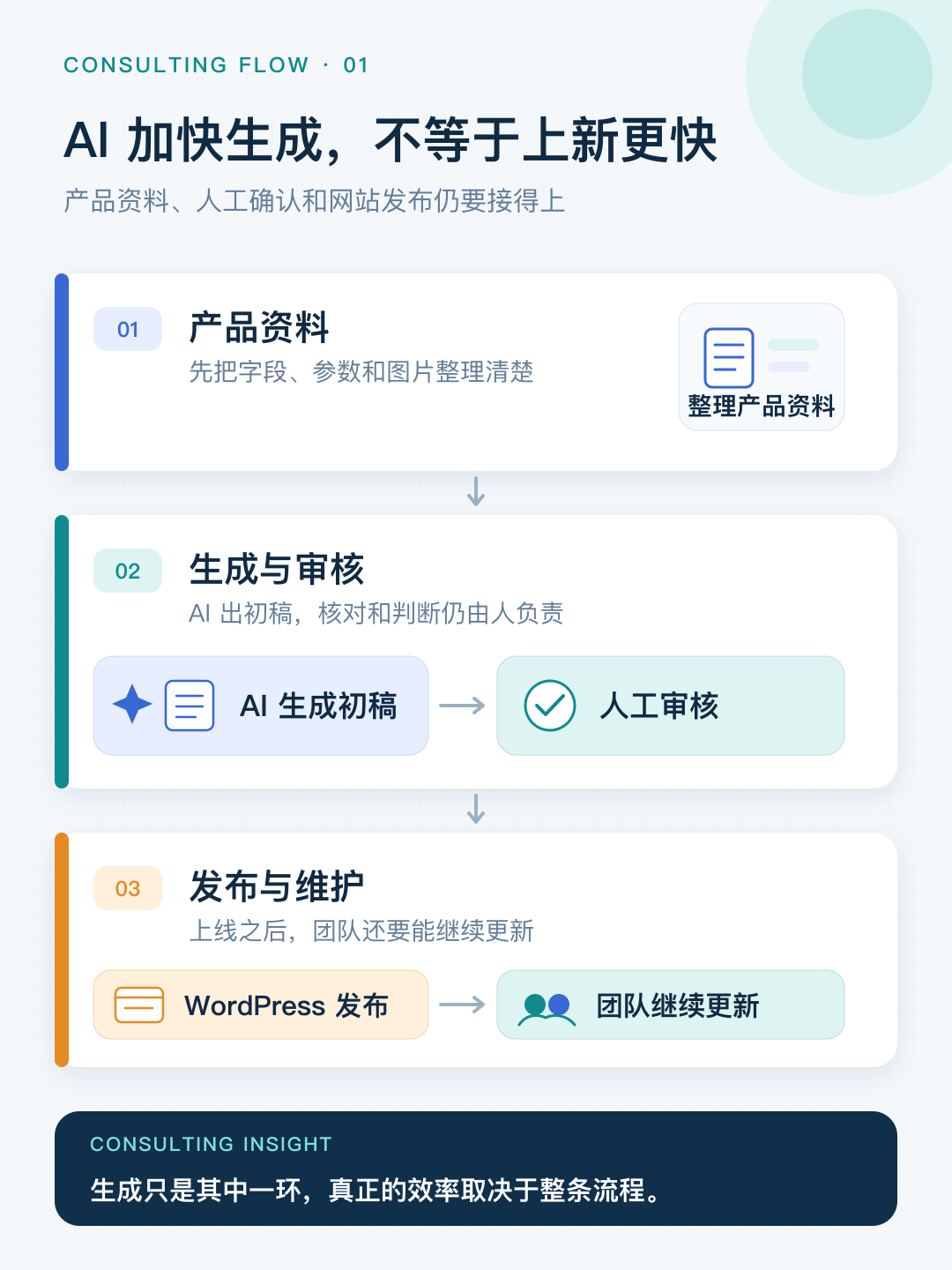
If adding a product takes ten steps, which ones does AI actually accelerate?
You know how many steps it takes to publish a product page. Roughly, the process looks like this:
Review specifications and older materials → draft a description → check parameters → confirm what can be made public → select and edit images → translate into target languages → have a native speaker review → upload and enter data → adjust formatting, images and internal links → check categories and filter attributes.
The clearest time saving from AI is drafting the description. It can also help with translation, organizing materials and data entry.
But assistance does not remove the responsibilities that follow.
Specifications must still be checked against source documents item by item; an error can cause an incident. Sales still needs to confirm what is public and what is customized for a customer and must remain private. Images still need selection and editing. Translated copy intended for European customers still needs review. Uploading, formatting, adding images and checking categories all remain.
Generation is faster, but the complete product-publishing workflow does not accelerate by the same proportion.
That gap creates the anxiety: you feel you should be much faster, but the overall improvement is modest. You begin to wonder whether the tool is wrong or the site is too old.
This concern is not unfounded. Some older sites lack standardized product fields, bulk processing and a clear backend, making frequent updates difficult. But the bottleneck may be site structure, product data, permissions or publishing processes. Switch technology before distinguishing them and you may carry the old problem with you.
Why does replacing WordPress not necessarily fix slow updates?
Many of those ten steps involve processing data rather than writing text.
Categories, models, specifications, images, downloads, page URLs, relationships between language versions and links between products are structure, not copy.
If products on the old site were laid out manually page by page, without shared fields or a clear data structure, AI output is difficult to use directly.
You still end up copying and pasting.
In that situation, WordPress is not necessarily the problem. More often, the original build never anticipated frequent product additions or bulk processing of product data.
A different technology will not change the speed much if products remain organized the same way.
A competitor moving quickly does not mean the decision was right. Some only discover afterward that the slow step came with them unchanged.
If you do not control the domain, hosting and backend, is it too early to discuss a rebuild?
This step is separate from whether to rebuild, but comes before every other decision.
Whose account holds the domain? Who opened the hosting account? Do you have an administrator account for the backend?
Some long-running sites still have domains and backend accounts registered to the original builder or agency. Before discussing a redesign, regain control of the domain, hosting and administrator permissions, then review the accounts and disable those that should no longer have access.
**Lacking control of permissions is not a reason to rebuild; it is a separate issue that must be resolved first.** Once control is restored, the site can often remain in use.
One further condition needs clarifying: when I say a site can still be maintained, I mean maintained safely. Core and plugins must still be updatable, and recoverable backups must exist. If neither condition holds, the immediate question is how to make the site safe to operate, rather than how much to change.
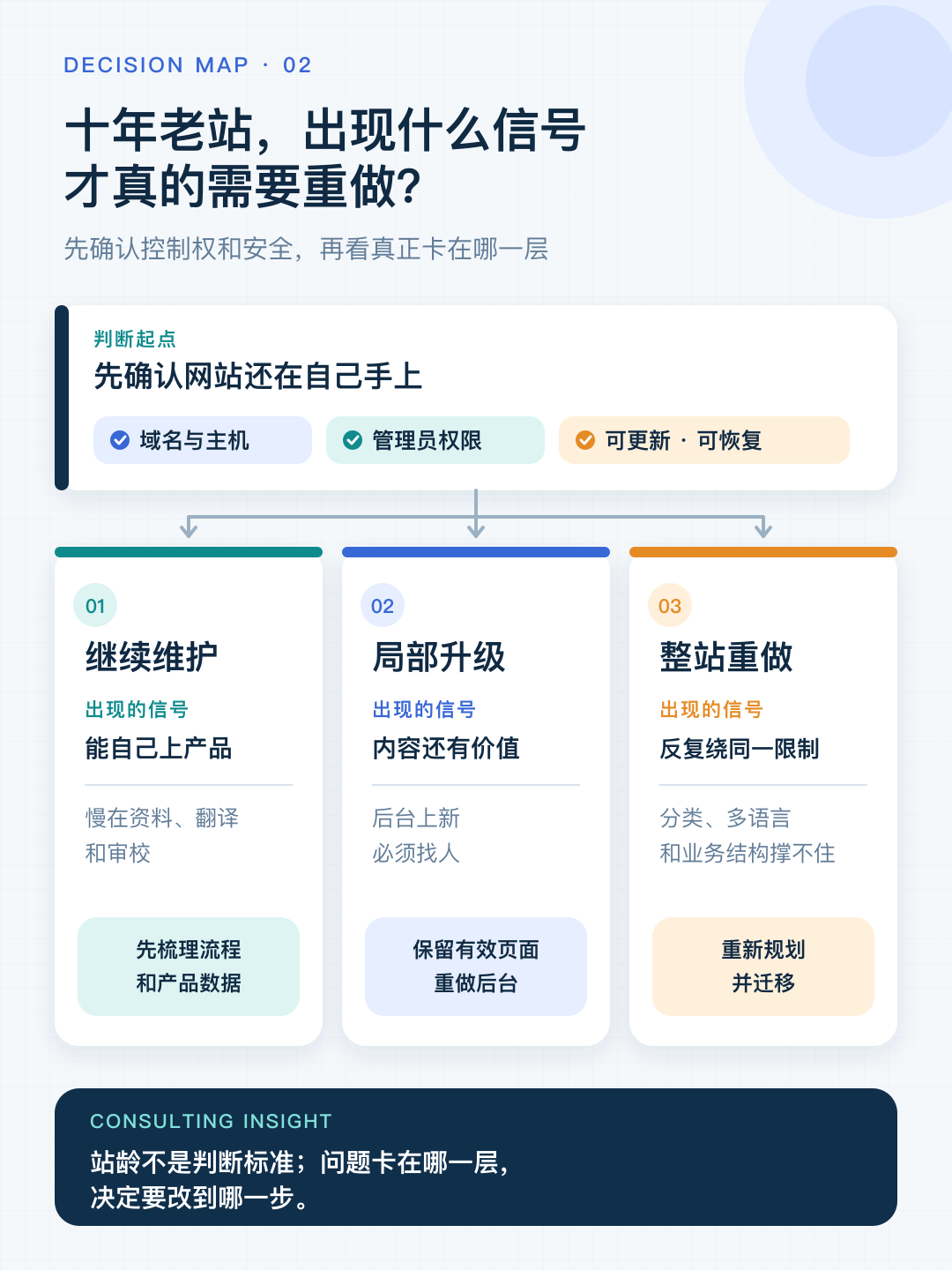
Continue maintenance, upgrade part of it or rebuild? Look for these three signals
Being unable to decide usually does not mean indecision. It means you have not yet classified your situation.
Return to the ten steps and look at how the most recent product was published. That reveals which layer is blocking you.
Signal 1: you can publish products yourself; the earlier steps are slow.
The product structure is reasonably clear, and you can access the backend and publish. The slow work is reviewing materials, checking specifications, translating and proofreading.
This kind of site usually does not need rebuilding. Change the process rather than the website: consolidate product information scattered across Excel, shared drives and chat histories, define fields, then use AI for drafts and translation before team review and publication. The site itself needs almost no change.
How to tell: did you or a colleague publish the last product independently? If so, you probably belong here.
Signal 2: the content remains valuable, but you cannot publish it without help.
Product fields are inconsistent, pages are manually laid out and every product addition needs a developer. You cannot add a specification or change a layout yourself.
This is better suited to a targeted upgrade. Keep the domain, effective pages and existing content. Reorganize product data, backend structure and publishing processes. What you need is a backend where you can publish products yourself, rather than necessarily a whole new website.
How to tell: did you need someone else to publish the last product? If so, first see whether changing only the backend is possible, rather than demolishing everything.
Signal 3: even with help, every change is another patch around the same limitation.
You once had one product series and now have several categories and languages. Previously you only displayed products; now you must also support retail, wholesale or customers in different regions.
Every new requirement means another patch on the old site. Products have no clear relationships and the backend cannot handle bulk work.
Only at this point is a full rebuild worth serious consideration.
How to tell: have recent changes repeatedly worked around the same limitation, such as insufficient product fields, categories that no longer fit or multilingual support based on copying entire sets of pages? If so, the problem is not poor patching. The structure can no longer support the requirements.
If you really rebuild, where do the money and time go?
Many people assume rebuilding costs come from coding. AI can indeed help with coding, but by producing a draft rather than guaranteeing correctness. Generated code still needs reading, testing and revision, and every item must be checked before launch. This is the same as product descriptions: faster generation does not remove verification, judgment or responsibility for the result.
Coding is only part of the work anyway. Three other areas consume most of the time:
**First, how disorganized is your product data?** Four hundred products with consistent fields and complete specifications are one kind of import. The same products scattered across dozens of Excel and PDF files, with inconsistent model names, are another. This workload depends not just on coding, but on the condition of your source materials.
**Second, multiple languages.** It is not enough to translate English five times. You must decide how URLs are organized, which content varies by market and who reviews it. Another language is more than another copy of the pages.
**Third, moving old pages.** Map old URLs to new ones, determine redirects and monitor after launch. Missing this work can affect existing traffic and inquiries.
With many products and languages, backend structure and verifiability amplify costs further. Also read Is AI Maintenance a Black Box? Building a Multilingual Site with Hundreds of Products.
So the claim that rebuilding should be much cheaper because AI can write code has two flaws: first, AI produces drafts rather than finished work, and verification and revision cannot be skipped or accelerated in direct proportion to generation; second, much of rebuilding was never coding work in the first place.
That is why rebuilding should be considered at Signal 3. If the first two levels can solve the problem, do not go that far.
How do you keep direct AI website changes from becoming a black box?
Another common concern is whether businesses will know what AI changed if it participates in maintenance. This is practical. If AI can directly modify the site without change records, review or recovery, faster updates may mean greater risk.
What a business really needs is not complete automation but an update process it controls. AI can prepare content, but who approves it? Can you see which pages it changed? Can incorrect product information be rolled back? Which small changes can the team handle, and which still require the provider?
Resolve these questions and AI saves time. Leave them unresolved and you have merely replaced dependency on people with another invisible dependency.
Still unable to decide? Answer these six questions first
- How many products are on the site now, and how many might there be in two or three years?
- How many new products are added each month, and who organizes their information?
- How many languages do you need? Are products and content the same across markets?
- Who on the team reviews content, and who publishes the final version?
- Are existing products managed consistently, or is every page built separately?
- Which old pages still generate traffic and inquiries?
If you can answer all six, you can usually determine the broad direction yourself.
The unanswered ones explain why the decision remains difficult. Unable to decide means missing information, not missing resolve.
Especially Question 6. Large traffic drops after rebuilds are not uncommon, and one common cause is failing to identify which old pages were still doing useful work.
A general framework only gives an initial assessment. How would we review your site?
The six questions above are a public framework for an initial assessment. For an actual site, we do not recommend a rebuild just because we hear "ten-year-old WordPress," nor do we judge only whether the homepage looks new.
Before diagnosis, we collect the website URL, product count, publishing frequency, language count and the slowest current step. If possible, also prepare source material for one real product and examples of pages still generating traffic or inquiries.
During diagnosis, we take that real product through the current publishing process, then review website control, product data, backend structure, review and publication, and existing page assets together. We classify the problem into the three groups above: a disconnected process, a backend needing targeted upgrades, or a structure that genuinely cannot support current needs.
The result should at least answer: which category the site belongs to, where the main problems lie, which assets should remain untouched, the available next steps, and roughly how much each costs and how long it takes.
This diagnosis is particularly useful in three situations:
- Older pages still generate traffic or inquiries, and you know you cannot simply demolish them but do not know what must be retained.
- Products and languages are increasing, and the current backend is becoming harder to maintain.
- Routine product publishing depends on external people, and the team cannot judge whether targeted upgrades are enough or a rebuild is truly necessary.
If work continues, it generally falls into three services:
- Process and product-data organization: consolidate materials, define fields and clarify responsibilities for AI generation, human review and publication. If the team can do the work itself, we say so directly. Using AI does not require a website rebuild.
- Targeted WordPress backend upgrades: retain the domain, effective pages and URLs where possible, while reorganizing product structure, backend permissions, backup and recovery, and routine product publishing.
- Full rebuild and migration: replan product, multilingual and page structures while handling old URL mappings, redirects, data migration, testing and post-launch checks.
Whichever route you take, delivery should not stop at the site going live. For tasks the client's team must perform independently, we provide backend training with a recording, document common workflows and agree on a period for post-delivery questions. The team handles routine updates and returns to us for complex adjustments as needed, rather than keeping everyday maintenance tied to a provider indefinitely.
Should a ten-year-old WordPress site ultimately be rebuilt?
Back to the opening question: if competitors produce content quickly with AI, should you immediately rebuild your own ten-year-old WordPress site?
Not necessarily. Some will leave, some will stay and upgrade only the backend, and some will leave the site alone and reorganize product information and publishing processes first. All three may have ten-year-old sites, but they are blocked at different layers.
When deciding whether to rebuild an established site, we therefore do not start by recommending technology or demolition based on age. First check who controls permissions, then how products are updated, who operates the system, what content needs review and what remains worth keeping. Only then choose retention, targeted upgrades or a new plan.
An article can offer a general framework. A decision for an actual site also requires examining control, product data, existing traffic, backend structure and team processes together.
Continue reading
- Previous: Is AI Maintenance a Black Box? Building a Multilingual Site with Hundreds of Products
- Start the series here: AI Website Builders Fall into Three Types, but Discussion in China Mostly Covers Just One
- View the full AI × WordPress series
Define the scope of your website changes
Share your existing site, content needs and current problems so we can discuss what to retain, take over or rebuild.